

 Markdown Monster
Problems with opening CHM Help files from Network or Internet
As a publisher of a Help Creation tool called Html Help Help Builder, I’ve seen a lot of problems with help files that won't properly display actual topic content and displays an error message for topics instead. Here’s the scenario: You go ahead and happily build your fancy, schmanzy Help File for your application and deploy it to your customer. Or alternately you've created a help file and you let your customers download them off the Internet directly or in a zip file.
The customer downloads the file, opens the zip file and copies the help file contained in the zip file to disk. She then opens the help file and finds the following unfortunate result:
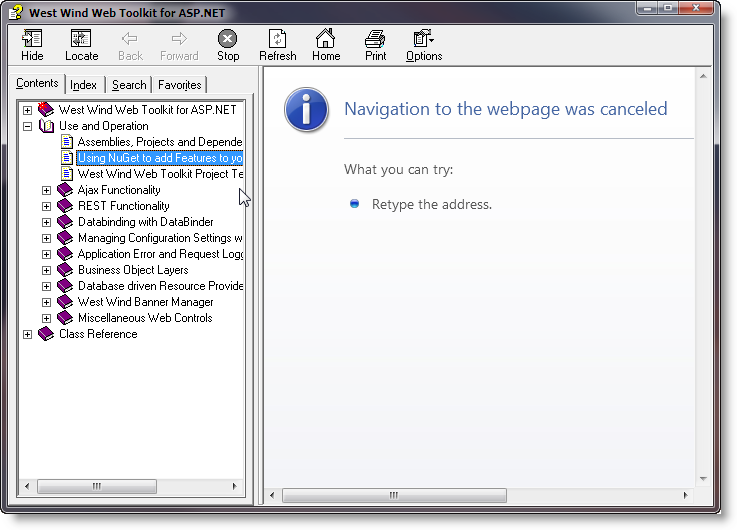
The help file comes up with all topics in the tree on the left, but a Navigation to the WebPage was cancelled or Operation Aborted error in the Help Viewer's content window whenever you try to open a topic. The CHM file obviously opened since the topic list is there, but the Help Viewer refuses to display the content. Looks like a broken help file, right? But it's not - it's merely a Windows security 'feature' that tries to be overly helpful in protecting you.
The reason this happens is because files downloaded off the Internet - including ZIP files and CHM files contained in those zip files - are marked as as coming from the Internet and so can potentially be malicious, so do not get browsing rights on the local machine – they can’t access local Web content, which is exactly what help topics are. If you look at the URL of a help topic you see something like this:
mk:@MSITStore:C:\wwapps\wwIPStuff\wwipstuff.chm::/indexpage.htm
which points at a special Microsoft Url Moniker that in turn points the CHM file and a relative path within that HTML help file. Try pasting a URL like this into Internet Explorer and you'll see the help topic pop up in your browser (along with a warning most likely). Although the URL looks weird this still equates to a call to the local computer zone, the same as if you had navigated to a local file in IE which by default is not allowed.
Unfortunately, unlike Internet Explorer where you have the option of clicking a security toolbar, the CHM viewer simply refuses to load the page and you get an error page as shown above.
How to Fix This - Unblock the Help File
There's a workaround that lets you explicitly 'unblock' a CHM help file. To do this:
- Open Windows Explorer
- Find your CHM file
- Right click and select Properties
- Click the Unblock button on the General tab
Here's what the dialog looks like:
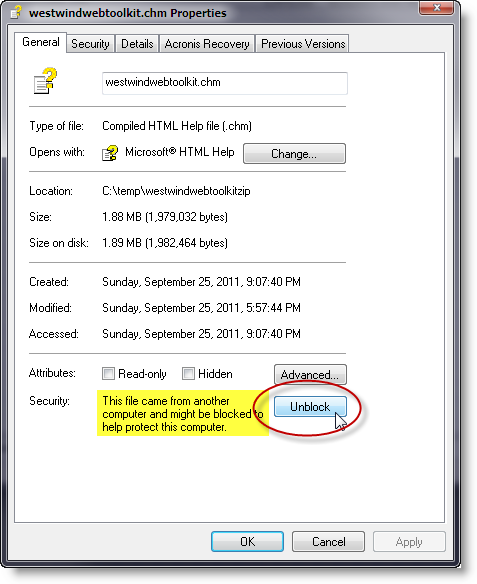
Clicking the Unblock button basically, tells Windows that you approve this Help File and allows topics to be viewed.
You can also use a Powershell command to do this (on Windows 10):
PS> unblock-file -Path '.\westwindwebtoolkit.chm'
Is Unblocking Safe?
Is unblocking insecure? Not unless you're running a really old Version of Windows (XP pre-SP1). In recent versions of Windows Internet Explorer pops up various security dialogs or fires script errors when potentially malicious operations are accessed (like loading Active Controls), so it's relatively safe to run local content in the CHM viewer. Since most help files don't contain script or only load script that runs pure JavaScript access web resources this works fine without issues.
How to avoid this Problem
As an application developer there's a simple solution around this problem: Always install your Help Files with an Installer. The above security warning pop up because Windows can't validate the source of the CHM file. However, if the help file is installed as part of an installation the installation and all files associated with that installation including the help file are trusted. A fully installed Help File of an application works just fine because it is trusted by Windows.
Summary
It's annoying as all hell that this sort of obtrusive marking is necessary, but it's admittedly a necessary evil because of Microsoft's use of the insecure Internet Explorer engine that drives the CHM Html Engine's topic viewer. Because help files are viewing local content and script is allowed to execute in CHM files there's potential for malicious code hiding in CHM files and the above precautions are supposed to avoid any issues.
Other Posts you might also like
The Voices of Reason

# re: Problems with opening CHM Help files from Network or Internet
# re: Problems with opening CHM Help files from Network or Internet
I navigate to a server/share where a piece of software is installed (as administrator) and attempt to open the help file. I see what you describe above. The software has been installed from disk and not downloaded from the Internet.
I usually copy the file to my desktop in order to be able to read it!
# re: Problems with opening CHM Help files from Network or Internet
http://www.codeproject.com/KB/cs/ntfsstreams.aspx

# re: Problems with opening CHM Help files from Network or Internet
PDFs do provide TOC so it should be good enough, not sure XPS does that but if it doesn't it better do it ASAP!
Dan

# re: Problems with opening CHM Help files from Network or Internet
As you can tell this is one topic that REALLY pisses me off and shows another area where a total lack of competition or incentive leaves Microsoft just not giving a shit.
# re: Problems with opening CHM Help files from Network or Internet
# re: Problems with opening CHM Help files from Network or Internet

# re: Problems with opening CHM Help files from Network or Internet
# re: Problems with opening CHM Help files from Network or Internet
http://support.microsoft.com/kb/896054
This definitely unblocks the content of the chm file.
I had to use the complete riddle:
REGEDIT4
[HKEY_LOCAL_MACHINE\SOFTWARE\Microsoft\HTMLHelp]
[HKEY_LOCAL_MACHINE\SOFTWARE\Microsoft\HTMLHelp\1.x\ItssRestrictions]
"MaxAllowedZone"=dword:00000001
"UrlAllowList"="\\\\productmanuals\\helpfiles;file://\\\\productmanuals\\helpfiles;http://www.wingtiptoys.com/help/"
"NestedProtocolList"="http:;ftp:"
Remember that the UrlAllowList can be your external usb drive or your networkshare, so you should adjust the line to your need.
# re: Problems with opening CHM Help files from Network or Internet
and \\ should be \
in the UrlAllowList line....

# re: Problems with opening CHM Help files from Network or Internet
Place the following code in each form's on_open event, preferrably before doing anything else on the On_open event.
The CHM file has to be located in the same directory as the database that is to use it as a help file.
<code lang="vb">
Dim CurDir As Variant
Dim HELPFILELOC As String
Dim HELPFILEDEST As String
Dim HELPFILE As String
HELPFILE = "Database-auto-backup.chm" 'change the name here to reflect your CHM file name.
CurDir = Left(CurrentDb.Name, Len(CurrentDb.Name) - Len(Dir(CurrentDb.Name))) 'Current directory where db resides
HELPFILELOC = CurDir & HELPFILE 'complete file path to the CHM file
HELPFILEDEST = Environ("USERPROFILE") & "\Desktop\" & HELPFILE 'completed destination for the chm file on the users desktop
If FileExists(HELPFILEDEST) Then 'check to see if the user already has the proper help file
Me.HELPFILE = HELPFILEDEST 'set the help file location for the form just to be sure.
Else
Call CopyFile(HELPFILELOC, HELPFILEDEST, False) 'the help file did not exist, so copy from DB folder to the current users desktop
Me.HELPFILE = HELPFILEDEST 'then set the help file location within the form
End If
</End Code>
# re: Problems with opening CHM Help files from Network or Internet
http://infotechadmin.blogspot.com/2008/12/chm-html-help-file-issues.html
# re: Problems with opening CHM Help files from Network or Internet
I deleted so many "chm" files because of this problem.

# re: Problems with opening CHM Help files from Network or Internet
cheers
# re: Problems with opening CHM Help files from Network or Internet
Just wanted to say that I've been searching the net for a solution on how to view chm-files from a network share on my Vista-system. None of the registry editing i found worked for me and I don't want to copy them to my local drive. If you have the same problem as me there is one simple solution: use a different chm-viewer. I'm using xchm (http://xchm.sourceforge.net/) and it is working perfect.

# re: Problems with opening CHM Help files from Network or Internet
The trick, of use the option right click, properties and unlock, it did resolve my problem.
# re: Problems with opening CHM Help files from Network or Internet
# re: Problems with opening CHM Help files from Network or Internet
it helped me a lot

# re: Problems with opening CHM Help files from Network or Internet
It breaks the web paradigm of being able to re-reach the same page you were at previously if you get interrupted on a page. By default, Ajax sites will do the same, but well designed ones won't. Well designed Ajax (and 1-addr->multipage webpages), keep track of user state in persistent cookies on the user's website. You leave -- when you re-enter, you get taken back to the page you left off from (or, often, interactively, Forward and Backward in your browser work correctly).
I've tried to type this note 3 times. Each time I needed to scroll up to look at the picture(s) in the article to make sure I had the correct wording from the pictures. I scrolled up using the scroll bar. When I scrolled back down, I'd forget to reclick in the input box (as I'd not (in my mind) ever clicked out of it, forgetfully/intuitively, breaking 'focus' within the content container as being separate from the scroll bar -- a design issue one could go into on the side, but not really pertinent to problem here). I'd start to type and not see anything, and think that maybe it was typing in information into the text box that wasn't shown (as it's text can be scrolled out of its window) -- anyway, it was an instinctive action that I just 'did' faster than I could stop and think about it.
The unfortunate part is the "webpage's" breaking of the web paradigm by disallowing a user to get back to where they were at by retyping in the address where they were at when they 'left'. In this situation, you have 2 (at least) different pages that are displayed through the same addr -- the default being one with existing comments and a "Comment" button, and the 2nd (the one I needed to get back to in order to continue my input -- the page with the expanded Comment input dialogue.
Since a submit is required to open the 2nd displayed page (w/the same URL), hitting the browser's forward command has it pop up a warning that it needs to 'resubmit' the input for that page in order to redisplay it. That's the problem. No way to get to back to back w/out a 'submit' which clears user's input. GRR, sigh....
Anyhow, simplest solution: don't have a 'Comment Button' that one needs to press to get to the expanded (open) "add comment" section. That way if one has accidentally gone back, they can easily go forward again w/out needing to resent input and they'll be returned to their original page with the text intact! Much happier user.
--- --- ----
AND NOW...for what I've tried to post 3 times now...
--- --- ----
None of the above info works or applies in my case.
I see no dialog from explorer. I only see one if I try to open it directly from winzip (about it being a 'dangerous' extension). But the instructions on the site where I downloaded it from (https://support.dell.com/support/edocs/systems/prn3115c/en/UG_En.zip), just say to unpack it, which I do.
Normally, if I download a zip file from a 'strange' site, the untrusted bit gets set (even on zip files). Any files extracted from a 'tainted' zip file also are extracted 'tainted'. However, I think since this was a trusted (https) site, the 'tainted' bit wasn't set in the first place.
Also, there was no Security dialog at the bottom of my file's prop page.
I first tried setting my 'local net's settings to 'lowest security' (I'm on a controlled isolated subnet). That didn't work.
Then I tried putting 'file:/\S:\' drive in my 'Trusted Server's zone'. It took it, in a fashion, and added file://Ishtar.
Anyway, time to "hunt & peck some more" (and sorry about the longer "OT 'rant'" at the top. I got tired of losing my text.
# re: Problems with opening CHM Help files from Network or Internet
Just to mention that if there are multiple files in the help folder you have to unblock each one individually.
# re: Problems with opening CHM Help files from Network or Internet
# trying to open chm file in internet explorer 6
In my applicaiton, i am trying to open the chm file link in internet explorer 6.0, but its opening the file with unreadable content.
i dont know what is the problem
support expected...
regards
areef

# re: Problems with opening CHM Help files from Network or Internet
# re: Problems with opening CHM Help files from Network or Internet
# re: Problems with opening CHM Help files from Network or Internet

# re: Problems with opening CHM Help files from Network or Internet
# re: Problems with opening CHM Help files from Network or Internet
Thanks a lot Rick..It was very helpful...
# re: Problems with opening CHM Help files from Network or Internet

# re: Problems with opening CHM Help files from Network or Internet
very short but it is work.....thanks olot..:))
# re: Problems with opening CHM Help files from Network or Internet

# re: Problems with opening CHM Help files from Network or Internet
# re: Problems with opening CHM Help files from Network or Internet
# re: Problems with opening CHM Help files from Network or Internet
# re: Problems with opening CHM Help files from Network or Internet

# re: Problems with opening CHM Help files from Network or Internet
# re: Problems with opening CHM Help files from Network or Internet
# re: Problems with opening CHM Help files from Network or Internet
# re: Problems with opening CHM Help files from Network or Internet

# re: Problems with opening CHM Help files from Network or Internet

# re: Problems with opening CHM Help files from Network or Internet
Hi All,
After reading thsi page , I realised that you guys can help me....
I am building up a Help Utlity for my profject in my PC( a simple .CHM with quit a few HTMLs)
I was facing two problems while deploying it in my Network.
1. When I try to open from some other USER login/PC.The screen throws me the below error.
/*****************************************************************/
Action canceled
Internet Explorer was unable to link to the Web page you requested. The page might be temporarily unavailable.
--------------------------------------------------------------------------------
Please try the following:
Click the Refresh button, or try again later.
If you have visited this page previously and you want to view what has been stored on your computer, click File, and then click Work Offline.
For information about offline browsing with Internet Explorer, click the Help menu, and then click Contents and Index.
**********************************************/
2. EVEN USING THE CHM file on my SYSTEM, in few case I was not able to view the images in the HTML document. Actually speaking my HTML pages are converted from WORD using SAVE AS HTML option.

# re: Problems with opening CHM Help files from Network or Internet
# re: Problems with opening CHM Help files from Network or Internet
works like a charm.
Actually .. THIS is what I call a security loophole, apparently, now your security pool has changed to that of ZIP file !
# re: Problems with opening CHM Help files from Network or Internet
# re: Problems with opening CHM Help files from Network or Internet

# re: Problems with opening CHM Help files from Network or Internet
This tip really helped out.
I also think that you have to save your chm file to a local storage (C:)
I didn't seem to get this working when I saved the chm file to a network share.
PS
Is this a repost since it popped up in my Google Reader today?
DS
# re: Problems with opening CHM Help files from Network or Internet

# re: Problems with opening CHM Help files from Network or Internet
# re: Problems with opening CHM Help files from Network or Internet
mk:@MSITStore:C:\wwapps\wwIPStuff\wwipstuff.chm::/indexpage.htm
You should be able to paste a URL like this (to a valid topic) into Internet Explorer and it should work. If it doesn't or complains that 'moniker' doesn't exist it means that the mapping is broken.
# re: Problems with opening CHM Help files from Network or Internet
Make sure the file name does not contain the '#' sign or even the folder name of the folder it's contained in.
Have a look at the post I've linked below.
http://saifulmuhajir.me/2011/01/23/solve-i-cant-open-chm-files-in-windows-7/
:)
# re: Problems with opening CHM Help files from Network or Internet
Please keep it up...
dna.
# re: Problems with opening CHM Help files from Network or Internet

# re: Problems with opening CHM Help files from Network or Internet

# re: Problems with opening CHM Help files from Network or Internet

# re: Problems with opening CHM Help files from Network or Internet
[HKEY_LOCAL_MACHINE\SOFTWARE\Wow6432Node\Microsoft\HTMLHelp\1.x\ItssRestrictions]
"MaxAllowedZone"=dword:00000001
# re: Problems with opening CHM Help files from Network or Internet