

 Markdown Monster
Strongly typed AppSettings Configuration in ASP.NET 5
 ASP.NET has long had an AppSettings style configuration interface that you see used by most applications. AppSettings in current versions of ASP.NET (4 and prior) is based on very basic string based key value store that allows you to store and read configuration values at runtime. It works reasonably well if your configuration needs are simple, but it quickly falls apart if your configuration requirements are more complex. The biggest issues are that by default you have access to the ‘AppSettings’ key only – with a bit more verbose of a syntax to access other sections. The other big downfall of this tooling is that the values stored have to be strings when often configuration values need to be at the very least numeric or logical values that have to be converted.
New Configuration System in ASP.NET 5
The configuration system in ASP.NET 5 has been completely overhauled and entire web.config/app.config mechanism has been thrown out in favor of a new pluggable system. The default configuration implementation uses a config.json file as storage, but the system is pluggable so other providers can be used instead as well as at the same time. For example, the default project template uses both config.json and environment variables, the latter of which override values in the .json file.
Default AppSettings
A new stock ASP.NET 5 project created with Visual Studio comes with a default AppSettings class which is meant to replace the old AppSettings functionality. Let’s start by looking of how this is hooked up.
Configuration settings are represented by a class that is mapped to configuration values that are stored in the configuration store. By default this store is a JSON file, but it can come from a number of sources. Here’s the default AppSettings class:
public class AppSettings
{
    public string SiteTitle { get; set; }
}
You can add properties to this class and those properties then become configuration values that you can match in your configuration file which by default is config.json – again with default settings here from a new project:
{
    "AppSettings": {
        "SiteTitle": "WebApplication2",
    },
    "Data": {
        "DefaultConnection": {
            "ConnectionString": "Server=(localdb)\\mssqllocaldb;Database=aspnet5-WebApplication1-414415dc-a108-49f3-a5e3-fdc4cf24ef96;Trusted_Connection=True;MultipleActiveResultSets=true"
        }
    }
}
The properties of the AppSettings property in the config.json are mapped to your AppSettings class.
Hooking up Configuration
As most system components in ASP.NET 5, configuration is hooked up via dependency injection and configured during startup of the application. It starts in the Startup class with the Startup method which is the entry point to any ASP.NET 5 application and configures basic feature support:
public class Startup
{
    public IConfiguration Configuration { get; set; }

    public Startup(IHostingEnvironment env)
    {
        // Setup configuration sources.
        var configuration = new Configuration()
            .AddJsonFile("config.json")
            .AddJsonFile($"config.{env.EnvironmentName}.json", optional: true);

        configuration.AddEnvironmentVariables();
        Configuration = configuration;
    }

}
Here the configuration provides is set up and support for Json file and Environment variable storage is defined. Notice that there are also two configuration files, the config.json and config.[Environment].json where
Once the application is bootstrapped, the ConfigureServices method is fired in the same class which is used to essentially hook up and configure behavior of various components. One of the things you can do in this method is to map configuration values to a configuration class.
public void ConfigureServices(IServiceCollection services)
{
    // Add Application settings to the services container.
    services.Configure<AppSettings>(Configuration.GetSubKey("AppSettings"));
    …
}
This code basically maps the AppSettings configuration key to an instance of your configuration class. You can map more than one configuration class here so it’s possible to make your configuration more modular – think of this like separate configuration sections in the old style.

Using Configuration Values
If you now want to use configuration values in your application you can inject the value into your code or Razor content.
This example injects AppSettings into a Controller:
public class HomeController : Controller
{
    private IOptions<AppSettings> AppSettings;

    public HomeController(IOptions<AppSettings> appSettings)
    {
        AppSettings = appSettings;
    }

    public IActionResult Index()
    {
        string siteName = AppSettings.Options.SiteTitle;
        return View();
    }
}
which is likely the most common scenario on how you would use a configuration object in your Web code. From here you can pass the AppSettings into view if required.
Injecting AppSettings into a View
You can also inject AppSettings directly into a view using the new @inject tag (although that seems dubious at best) and in fact that’s what the Shared _layout template does by default:
@inject IOptions<AppSettings> AppSettings
<!DOCTYPE html>
<html>
    <head>
        <meta charset="utf-8" />
        <meta name="viewport" content="width=device-width, initial-scale=1.0" />
        <title>@ViewBag.Title - @AppSettings.Options.SiteTitle</title>
It injects the AppSettings class and uses the Options to display the Site title in the header. I suppose the injection in this case makes sense since the _Layout template doesn’t have an explicit model associated, but for any other type of view I’d recommend passing any configuration object as part of your model rather than injecting it.
Adding additional Configuration Values
If you want to add additional configuration values, you simply add a new property to your configuration class and add a key to the config.json file.
Add the property:
public class AppSettings
{
    public string SiteTitle { get; set; }
    public int MaxListCount { get; set; } = 15;
}
and also add the value in the config.json:
{
    "AppSettings": {
        "SiteTitle": "My Lovely Application",
        "MaxListCount":  20
    }
}
Technically you don’t have to add the value in the file, but you should make sure that the two match.
Then if you want to access this value in your code you should be able to do:
public IActionResult Index()
{
    string siteName = AppSettings.Options.SiteTitle;
    int maxItems = AppSettings.Options.MaxListCount;  // 20
    return View();
}
and you should get a value of 20 based on the value we have stored in the config file. Note that the value is a number and automatically converted for you unlike in the old ASP.NET configuration system.
Nested Configuration
Ok strongly typed configuration is nice for simple types, but it’s even nicer if you are dealing with more complex configurations. You can create nested types for nested configuration storage. So for example we could change AppSettings to:
public class AppSettings
{
    public string SiteTitle { get; set; }
    public int MaxListCount { get; set; } = 15;
    public ThemeOptions ThemeOptions { get; set; } = new ThemeOptions();
}

public class ThemeOptions
{
    public string ThemeName { get; set; } = "Default";
    public string Font { get; set; } = "'Trebuchet MS','Trebuchet','sans serif'";
}
and our config.json to:
"AppSettings": {
    "SiteTitle": "My Lovely Application",
    "MaxItems": 20,
    "ThemeOptions": {
        "ThemeName": "WaveBot",
        "Font": "'Helvetica Neue',Arial,'sans serif'"
    }
},
Then to use it in our HomeController:
string theme = AppSettings.Options.ThemeOptions.ThemeName; // WaveBot
Nice.
Adding a new Configuration Class
Having a single configuration class works, but sometimes you need more than a single piece of configuration. If you’re building a self-contained component for example, you won’t want to mix in your configuration settings with the standard AppSettings – it’s much cleaner to have a completely separate configuration key.

To do this we first need a new class. Here’s an example:
public class LoggingConfiguration
{
    public LogModes LogMode { get; set; } = LogModes.TextFile;
    public string LogFile { get; set; } = "~/logs/ApplicationLog.txt";
    public string ConnectionString { get; set; }
    public int LogDays { get; set; } = 7;
}

public enum LogModes
{
    TextFile = 0,
    Database = 1,
    XmlFile = 2
}
Now we need to register this class as a configuration source in the ConfigureServices code in Startup.cs so ASP.NET knows about it and can inject the class:
public void ConfigureServices(IServiceCollection services)
        {
            // Add Application settings to the services container.
            services.Configure<AppSettings>(Configuration.GetSubKey("AppSettings"));
            services.Configure<LoggingConfiguration>(Configuration.GetSubKey("LoggingConfiguration"));
Then I need to add the key to my config.json:
"LoggingConfiguration": {
    "LogMode": "XmlFile",
    "LogFile": "~/logs/MyApplicationLog.xml",
    "ConnectionString": "",
    "LogDays": 10
},
Next I need to inject into my point of use – the Controller in this case:
private IOptions<AppSettings> AppSettings;
private IOptions<LoggingConfiguration> LoggingConfiguration;

public HomeController(IOptions<AppSettings> appSettings,
                      IOptions<LoggingConfiguration> loggingConfig)
{
    AppSettings = appSettings;
    LoggingConfiguration = loggingConfig;
}
And finally I can use the values in my controller code:
string logFile = LoggingConfiguration.Options.LogFile;
int days = LoggingConfiguration.Options.LogDays;
And voila – we now have our custom configuration values and even a custom configuration object.
But, hold on – not so fast. There is a problem…
Enums are not Serialized
Above I mentioned that serialization from JSON is capable of strongly typed values – and that’s not entirely true. This enum value:
var mode = LoggingConfiguration.Options.LogMode;
is not properly deserialized. The mode value in this case always comes up with the default value set as the class property default (TextFile).
Unfortunately, this is a bug (in beta4) in the runtime code and unless you want to dig into runtime code and modify it we’re stuck with this behavior. For now – if you don’t want to change anything – stay away from enum values but it looks like this issue is fixed for the next beta/rc release.
In my next post I’ll describe how we can track down this runtime bug, fix it and actually apply it to the running application.
Other Configuration Sources
The JSON configuration is the most obvious configuration store because it actually shows up in your project as a file. But you can also use other configuration stores like EnvironmentVariables, INI files and a UserSecrets store. You can also build your own by extending the configuration interfaces which are relatively easy to create.
Configuration sources are applied only if you configure them as part of the startup configuration. For example, in this application I added:
var configuration = new Configuration()
    .AddJsonFile("config.json")
    .AddJsonFile($"config.{env.EnvironmentName}.json", optional: true);

if (env.IsEnvironment("Development"))
{
    // This reads the configuration keys from the secret store.
    // For more details on using the user secret store see http://go.microsoft.com/fwlink/?LinkID=532709
    configuration.AddUserSecrets();
}
configuration.AddEnvironmentVariables();
Configuration providers are cumulative and last one that has a match wins. So if I configure my JSON.config file with SiteName but then add an environement variable with the key I’m looking for the environment variable wins – that’s the value used.
How does this work?
Behind the scenes the configuration system consists of two major components: the configuration provider whose responsibility it is to capture the configuration values as key value pairs, and an OptionsModel that essentially exposes that dictionary as the strongly typed object source (or key values) that you created.
In your application you typically interact only with the IOption<T> instance of the strongly typed class you provided – the raw IConfiguration class is not injectable by default and I couldn’t see an easy way to get access to this raw store of the parsed configuration data. The configuration class is typically accessible only during startup configuration where you’ll see the string based path syntax used, while in application code you are likely to see the injected IOption<T> strongly typed values instead.
So typically you get a hold of the configuration via injection of the options:
public HomeController(IOptions<AppSettings> appSettings,
                      IOptions<LoggingConfiguration> loggingConfig)
The Options object is populated when the application starts, and unlike classic ASP.NET applications, changes to config.json or any other of the configuration files don’t automatically restart the Web application with the changes applied.

You might think that it would be easy to parse a JSON object to an a model class, but that’s not how the system actually works. Instead the input configuration source is parsed into a string dictionary first. For the JSON provider this means parsing the JSON object into a tokenized JSON list (using Json.net’s JsonReader) and then creating the keys for each of the non-complex properties.
Internally configuration information is initially stored as a string dictionary that represents keys as a ‘path string’ in the format of:
AppSettings:SiteTitle
AppSettings:ThemeOptions:ThemeName
You essentially build a configuration ‘path’ that describes the same structure you’d see in a config.json file replacing each . with a :
{
"AppSettings": {
    "SiteTitle": "My Lovely Application",
    "MaxItems": 20,
    "ThemeOptions": {
        "ThemeName": "WaveBot",
        "Font": "'Helvetica Neue',Arial,'sans serif'"
    }
},
"LoggingConfiguration": {
    "LogMode": "XmlFile",
    "LogFile": "~/logs/MyApplicationLog.xml",
    "ConnectionString": "",
    "LogDays": 10
},
}
Because the data is parsed into string keys and values first, it’s possible to present the layout with just about any provider. So with environment variables you can declare an environment variable like this:
SET DATA:APPSETTINGS:THEMEOPTIONS:THEMENAME=Console
dnx . web
In a live environment you’d either setup these environment variables as part of your global configuration or you set them as part of a startup command script you run before the application is launched from the command line with dnx . web for example.
If you’re debugging inside of Visual Studio with IIS Express there’s a Debug option that allows you to set environment variables as part of the startup:
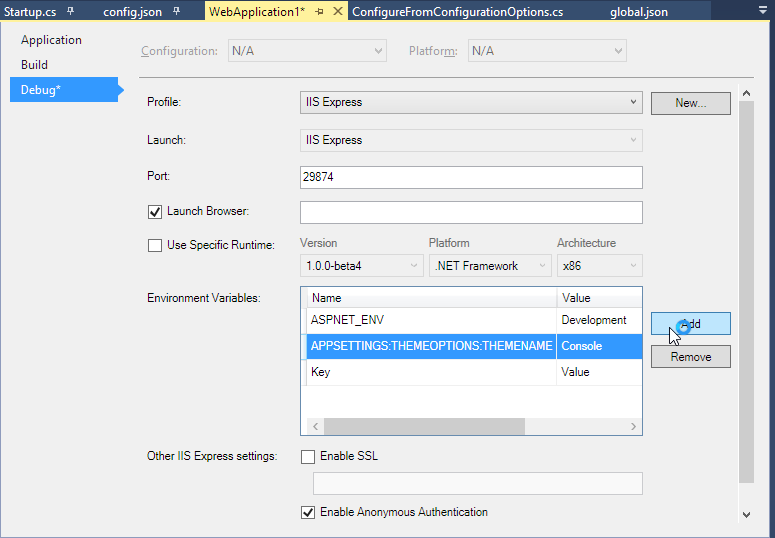
If you’re on a live standalone server you can set system level keys, as you can on Azure by setting the values in the Azure Portal for your Web application. Be careful if you end up using global environment variables so that you don’t duplicate keys!
Environment variables are useful for some override scenarios but I don’t think they are a great solution for most configuration options. I’d consider using them only for overriding configuration values that are otherwise set in a common configuration. Curious to hear other use cases where environment variables make sense.
User Secrets Store
The ASP.NET runtime also includes a user secrets store which is a command line tool that adds values to a machine only store. The only way to get values in and out of that service is via a command line tool that uses a secret key which is great for configuration values that are user or machine specific and should not be shared in source control. You have to explicitly add the values and those values.
You can find out more about how this works on the GitHub documentation page for the DNX Secret Documentation. Personally I had issues getting the tool to work – I kept getting errors related to a missing assembly on Beta4. But I’ve had this working in previous versions so this is likely just a glitch in my configuration.
Summary
These configuration changes are a big improvement over the old string only configuration system. Having strongly typed POCO resources to hold configuration information is the way to go. In the past I’ve used my Westwind.ApplicationConfiguration library for providing many of the same features (and a bit more), and I’m happy to see that I probably can retire that library and just use the existing config system in ASP.NET 5 now.
There’s a little more complexity here and as with anything in ASP.NET 5 you have to deal with the dependency injection to get the values into your app. There’s also some inconsistency with how you use the config values between the startup confguration (string paths/values) vs the strongly typed classes that are injected. While all of this works just fine for ASP.NET applications, I’m not so sure that it will work so well if you need to build configuration features into your own components where you might not so easily have access to the DI features – it’ll bear some experimenting.
Overall I like what I see and the way configuration works now addresses most of the complaints I’ve had about the AppSettings API that existed in older versions of .NET natively.
Although I ran into that Enum bug I mentioned, that’s a bug that’s already addressed in future releases. In my next post I’ll describe how to drill into the problem runtime code, fix it in the beta 4 build I’m using and then use it in my own application. Until then…
Other Posts you might also like
- Adding minimal OWIN Identity Authentication to an Existing ASP.NET MVC Application
- Resolving Paths To Server Relative Paths in .NET Code
- Map Physical Paths with an HttpContext.MapPath() Extension Method in ASP.NET
- Back to Basics: Rewriting a URL in ASP.NET Core
- Getting the Client IP Address in ASP.NET Core
The Voices of Reason

# re: Strongly typed AppSettings Configuration in ASP.NET 5
Thanks
// Ryan

# re: Strongly typed AppSettings Configuration in ASP.NET 5

# re: Strongly typed AppSettings Configuration in ASP.NET 5
@Ryan - the default implementation looks in a specific folder as part of the Web application. I don't see any overrides for locating the file elsewhere. However, you can create custom providers that can do this. You could sublcass the provider and add path info and management into the implementation then use that implementation.
@Ken - You shouldn't need transforms with the ability to load special 'Environment' versions of configuration files that override the 'base' functionality. You would just ship a custom config file for each environment (config.Production.json, config.Staging.config, config.Development.json) and put your overrides in each as needed.

# re: Strongly typed AppSettings Configuration in ASP.NET 5
namespace MyWebSite.Configuration
{
    public static class Config
    {
        public static string SiteTitle { get { return ConfigurationManager.AppSettings["SiteTitle"]; } }
        public static int MaxListCount { get { return int.Parse(ConfigurationManager.AppSettings["MaxListCount"] ?? "15"); } }
        public static class ThemeOptions {
            public static string ThemeName { get { return ConfigurationManager.AppSettings["Theme:Name"]; } }
            public static string Font { get { return ConfigurationManager.AppSettings["Theme:Font"]; } }
        }
    }
}
Then it's just a matter of accessing the config values via the static class properties, from any code, without the complexity of DI, and the standard web.config override functions apply to it:
   <title>@Configuration.Config.SiteTitle</title>

   Configuration.Config.ThemeOptions.Font
# re: Strongly typed AppSettings Configuration in ASP.NET 5
As as I mentioned in the post I have a configuration library that provides similar functionality in current versions of .NET, which fits somewhere in the middle between what you're doing with your static class and what vNext provides. The advantage of a library is that you get to abstract away the provider so that you can store in different configuration stores, which makes it much easier to re-use the functionality in components which is difficult and ugly for your implementation (but then again it may not be needed).
You might want to check out West Wind ApplicationConfiguration which lets you use simple strongly typed classes that handle all the strong type conversions for you and access them easily from anywhere in your app via a staticly stored instance:
https://github.com/RickStrahl/Westwind.ApplicationConfiguration
# re: Strongly typed AppSettings Configuration in ASP.NET 5
public void ConfigureServices(IServiceCollection services)
{
    services.Configure<AppSettings>(Configuration.GetSubKey("appSettings"));

    // I now want to access the mapped app settings for other service configuration, example:

    services.ConfigureCookieAuthentication(options =>
    {
        options.CookieName = appSettings.Options.CookieName;
    });
}
Can I resolve the AppSettings class in some way immediately after this initial services.Configure?
Thanks.
# re: Strongly typed AppSettings Configuration in ASP.NET 5
services.ConfigureCookieAuthentication(options =>
    {
        options.CookieName = Configuration["appSettings:CookieName"];
    });
or maybe more appropriately, defer the logic to do any actual configuration in the Configure() method which can simply inject the value:
public void Configure(IApplicationBuilder app, IHostingEnvironment env,
                              ILoggerFactory loggerfactory,
                              IOptions<AppSettings> appSettings)
{
       var name = appSettings.Options.CookieName;
}

# re: Strongly typed AppSettings Configuration in ASP.NET 5
Thanks!

# re: Strongly typed AppSettings Configuration in ASP.NET 5
Cheers,
Ryan

# re: Strongly typed AppSettings Configuration in ASP.NET 5
so:
            //Not sure which path to specify, this is the "wwwroot" path which is wrong for the config file
            var configuration = new ConfigurationBuilder(env.WebRootPath)
                //You could specify "..//config.json" but that will not work in published site
                 .AddJsonFile("config.json")
                 .AddJsonFile($"config.{env.EnvironmentName}.json", optional: true)
             .AddEnvironmentVariables();

            Configuration = configuration.Build();
And
services.Configure<AppSettings>(Configuration.GetConfigurationSection("AppSettings"));
# re: Strongly typed AppSettings Configuration in ASP.NET 5
# re: Strongly typed AppSettings Configuration in ASP.NET 5
A few points
1. Can I "multi-instance" the settings? As an example, if I have a PostcodeConfiguration class, can I create 3 different configurations, one to hold Scottish postcodes, one to hold GreaterLondonPostcodes, and one to hold BlacklistedPostcodes? Same class, different data. It is easy to do this in the existing configuration system using named sections.
2. Are the injected settings immutable? They don't look like it based on the example. They really ought to be, classes that need access to the settings rarely, if ever, actually need to change them. I can't recall ever having to change a setting in code. And immutability allows you to create them as singletons.
3. OK, the existing XML based config system may be verbose but at least it allows comments, which can be a great help to support people. JSON, for reasons mainly related to obstinancy, does not allow comments.
Like you I have written my own little utility to deal with the configuration system (BassUtils on NuGet). The approach I took was to define a class - just like your LoggingConfiguration, for example, then define a read-only interface for that class (ILoggingConfiguration). Services that need access to the settings just declare a dependency on the interface and IoC supplies the relevant instance. And the loading of the LoggingConfiguration class from the XML was done using the XmlSerializer, and can deal with things like defaults, and validation annotations such as regexes, min/max ranges etc.
# re: Strongly typed AppSettings Configuration in ASP.NET 5
1. You can create multiple classes, both of different types as well as of the same type by providing different names.
2. The configuration objects are loaded once at startup and then not touched again. But they are just plain POCO objects with writable properties so you can definitely change the values and those changed values will reflect in subsequent accesses. So no not immutable, but loaded from store only once. Haven't checked to see if there might be a way to reload from store which would be useful.
3. This could be supported and JSON.NET does support comments AFAIK, but I think JSON.NET is not loaded on initial startup and there's some custom parser doing the JSON reading. That may have changed, but I agree. Comments are a vital feature and the complaints have been lound on that.
# re: Strongly typed AppSettings Configuration in ASP.NET 5
//add IApplicationEnvironment to contructor and use appEnv.ApplicationBasePath
public Startup(IHostingEnvironment env, IApplicationEnvironment appEnv)
        {
            // Setup configuration sources.
            var configuration = new ConfigurationBuilder(appEnv.ApplicationBasePath)
                 .AddJsonFile("config.json")
                 .AddJsonFile($"config.{env.EnvironmentName}.json", optional: true)
             .AddEnvironmentVariables();

            Configuration = configuration.Build();
        }
# re: Strongly typed AppSettings Configuration in ASP.NET 5
It is only accesible via ASP.NET 5?
# re: Strongly typed AppSettings Configuration in ASP.NET 5
CoreCLR doesn't have a built in mechanism for reading this data, so you'd have to build your own if you need it, but then you wouldn't do that. CoreCLR will just use the new configuration system.
# re: Strongly typed AppSettings Configuration in ASP.NET 5
C:\Users\inspiron\.dnx\runtimes\dnx-clr-win-x86.1.0.0-beta6-12108\bin\dnx.exe.config
It is the path of dnx, and it makes sense, because I'm executing the application with dnx.
So, the best I can do is look for the file in the current directory, a fragile solution.
# re: Strongly typed AppSettings Configuration in ASP.NET 5
Using IIS you'll get the infrastructure, but I'm not 100% if you can get access to HttpContext from within a DNX application - have to try that to see. Ultimately, that's how the web configuration finds all the paths and locations for configuration.
# re: Strongly typed AppSettings Configuration in ASP.NET 5

# re: Strongly typed AppSettings Configuration in ASP.NET 5
# re: Strongly typed AppSettings Configuration in ASP.NET 5

# re: Strongly typed AppSettings Configuration in ASP.NET 5
Do you have any idea how you do the following on linux
SET DATA:APPSETTINGS:THEMEOPTIONS:THEMENAME=Console
I can't seem to find how to excape the colon in the key name, so it says it's not a valid identifier... :S
# re: Strongly typed AppSettings Configuration in ASP.NET 5
https://github.com/aspnet/Logging/blob/dev/samples/SampleApp/Program.cs
will this work for you?
# re: Strongly typed AppSettings Configuration in ASP.NET 5

# re: Strongly typed AppSettings Configuration in ASP.NET 5
<connectionStrings>
    <add name="RavenHQ" connectionString="Url=http://localhost:8080;Database=ModelFarmDb" />
</connectionStrings>
I would initialize my RavenDb with
 var documentStore = new DocumentStore
            {
                ConnectionStringName = "RavenHQ",
                Conventions = new DocumentConvention
                {
                    IdentityPartsSeparator = "-"
                }
            };
Raven would pick up the ConnectionStringName from the web.config. When deployed on Azure, it too would happily pick up the ConnectionStringName.
I can't work out how to write the config.json file to do the same thing.
I've tried
{
    "Data": {
        "RavenHQ": {
            ConnectionString: "Url=http://localhost:8080;Database=ModelFarmDb"
        }
    }
}
but it doesn't work. Any suggestions on how to directly map the web.config sections to config.json so as not to break other libraries that assume a web.config?
The app is running under IIS Express locally and is a web app on Azure.
Many thanks
Jeremy
# re: Strongly typed AppSettings Configuration in ASP.NET 5

# re: Strongly typed AppSettings Configuration in ASP.NET 5
Like Dan, I'm am no longer able to figure out the appsettings stuff with the RTM release. A lot of this code is basically no longer valid. Could you comment on this if you are able to find out what happened?
# re: Strongly typed AppSettings Configuration in ASP.NET 5
# re: Strongly typed AppSettings Configuration in ASP.NET 5
It looks like it is also possible to access the AppSettings in a strongly typed manner using ConfigurationBinder with the following syntax:
var someString= ConfigurationBinder.Bind<AppSettings>(_configInstance).SomeProperty;
However i am getting a very strange issue where it will return the property value only if it is set at the class level, not in the config.json file. Not sure if that is a bug or what. I'm running on beta5. I have not debugged into it to see whats actually going on with that behavior but surely it should return the value in the json file as well.

# re: Strongly typed AppSettings Configuration in ASP.NET 5
# re: Strongly typed AppSettings Configuration in ASP.NET 5
Great article, but my only remaining concern is for security - the .json files could be easily referenced from client side (e.g. malicious user knowing the existance of such config.json could simply open it up in his browser) - so all that was previously protected by putting it in web.config (IIS made sure visitors don't get to it) is now open for viewing - connection strings, sensitive server settings etc...
Is the config.json protected somehow, or we need to do some manual work there?
Thanks,
Veljko
# re: Strongly typed AppSettings Configuration in ASP.NET 5

# re: Strongly typed AppSettings Configuration in ASP.NET 5
services.AddSingleton<IConfiguration>(_ => Configuration);
I don't know why you'd need it though, the strongly-typed version should be sufficient for most use cases.
# re: Strongly typed AppSettings Configuration in ASP.NET 5
services.Configure<AppSettings>(Configuration.GetConfigurationSection(nameof(AppSettings)));

# re: Strongly typed AppSettings Configuration in ASP.NET 5
Essentially I'm looking for a way to create a strongly typed configuration, however I keep getting an InvalidOperationException... Of course DI never throws the error so I have yet to be able to see the stack trace or anything else of value.
services.Configure<LIS.Core.Configuration.CORSConfiguration>(this.Configuration.GetConfigurationSection("CORS"));
Any ideas?
# re: Strongly typed AppSettings Configuration in ASP.NET 5
Cybersource and Paypal, to name just a couple, rely on certain keys being present. There is nowhere on their objects to set those values. I can't work out how to provide the required data. I've set up an appsettings section in the web.config under wwwroot - but was ignored.
# re: Strongly typed AppSettings Configuration in ASP.NET 5

# re: Strongly typed AppSettings Configuration in ASP.NET 5
# re: Strongly typed AppSettings Configuration in ASP.NET 5

# re: Strongly typed AppSettings Configuration in ASP.NET 5
Configuration = builder.Build().ReloadOnChanged(“appsettings.json”);
questions:
1: how to observe other providers if any (multiple files)
2: actually reload is working, but it’s not reflected to the Optionsmodel (strongly typed approach), how to achieve that?
3: how to be informed about a config changes in a ‘kind of central place’ to take some further actions (Server restart, etc.)
thanks in advance

# re: Strongly typed AppSettings Configuration in ASP.NET 5
For example, I have my SqlConnectionString in appsettings.json and now I need access to it in a Model and a Logger custom class. How do I get it there? Or will I need to have the calling Controller "supply" the options down the line to the Model and Logger classes? And even if so, isn't that a cloogy design?
Any thoughts on this?
# re: Strongly typed AppSettings Configuration in ASP.NET 5
Last I looked this involved having to provide the DI interfaces as part of your components so that you can - if not provided - inject these things yourself. I'm not a big fan of that - like you I believe components should be able to self-configure without explicit dependencies passed in that have to be set up elsewhere (other than a configuration setting somewhere).
# re: Strongly typed AppSettings Configuration in ASP.NET 5