


Programmatically listing, getting and setting Application Pools
I’m updating several of my Web Configuration utilities for various applications that provide post-installers or tools to otherwise set up Web sites. With Vista rolling around being able to select an application pool to assign the site to is becoming more important because in IIS7 the Application Pool determines the .NET version that is used as well as the pipeline mode (classic or the new integrated mode). So for setting up ASP.NET 2.0 applications typically you’ll want to select a classic pipeline application pool for the application so you can get easy debugging (debugging integrated mode with VS takes a little more work).
I’m updating this stuff specifically for my West Wind Web Store configuration utility as well as a standalone tool the Web Configuration Tool both of which need this functionality. Here’s what the Web Site Configuration Tool looks like:
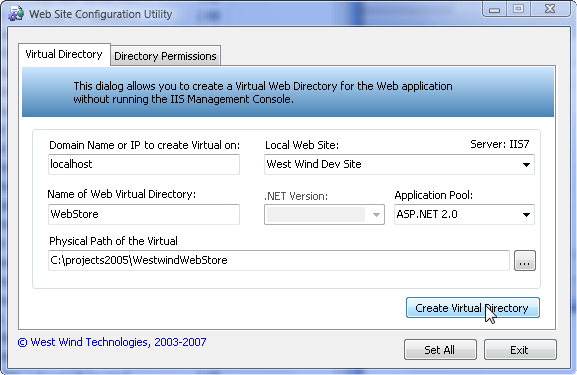
In this case it’s using IIS 7 so the .NET version isn’t selectable as it’s selected as part of the Application Pool. For IIS 6 both .NET version and App Pool are available for IIS 5 only the .NET version is available.
So how do you get the ApplicationPools available, select and set one and create a new one? There are actually a number of ways (especially with IIS7) but the most widely supported by recent versions of IIS is still by using ADSI and DirectoryServices in .NET.
I talked about using ADSI for IIS with .NET a long while back with some examples of how to get virtuals and set properties etc. there.
So, here’s some additional code to deal with Application Pools in my WebConfiguration class (note there are a few depencies in this code, but you should be able to glean the general idea):
/// <summary>
/// Returns a list of all the Application Pools configured
/// </summary>
/// <returns></returns>
public ApplicationPool[] GetApplicationPools()
{
if (ServerType != WebServerTypes.IIS6 &&
ServerType != WebServerTypes.IIS7)
return null;
DirectoryEntry root = this.GetDirectoryEntry("IIS://" + this.DomainName + "/W3SVC/AppPools");
if (root == null)
return null;
List<ApplicationPool> Pools = new List<ApplicationPool>();
foreach (DirectoryEntry Entry in root.Children)
{
PropertyCollection Properties = Entry.Properties;
ApplicationPool Pool = new ApplicationPool();
Pool.Name = Entry.Name;
Pools.Add(Pool);
}
return Pools.ToArray();
}
/// <summary>
/// Create a new Application Pool and return an instance of the entry
/// </summary>
/// <param name="AppPoolName"></param>
/// <returns></returns>
public DirectoryEntry CreateApplicationPool(string AppPoolName)
{
if (this.ServerType != WebServerTypes.IIS6 &&
this.ServerType != WebServerTypes.IIS7)
return null;
DirectoryEntry root = this.GetDirectoryEntry("IIS://" + this.DomainName + "/W3SVC/AppPools");
if (root == null)
return null;
DirectoryEntry AppPool = root.Invoke("Create","IIsApplicationPool",AppPoolName) as DirectoryEntry;
AppPool.CommitChanges();
return AppPool;
}
/// <summary>
/// Returns an instance of an Application Pool
/// </summary>
/// <param name="AppPoolName"></param>
/// <returns></returns>
public DirectoryEntry GetApplicationPool(string AppPoolName)
{
DirectoryEntry root = this.GetDirectoryEntry("IIS://" + this.DomainName + "/W3SVC/AppPools/" + AppPoolName);
return root;
}
/// <summary>
/// Retrieves an Adsi Node by its path. Abstracted for error handling
/// </summary>
/// <param name="Path">the ADSI path to retrieve: IIS://localhost/w3svc/root</param>
/// <returns>node or null</returns>
private DirectoryEntry GetDirectoryEntry(string Path)
{
DirectoryEntry root = null;
try
{
root = new DirectoryEntry(Path);
}
catch
{
this.SetError("Couldn't access node");
return null;
}
if (root == null)
{
this.SetError("Couldn't access node");
return null;
}
return root;
}
AppPools are stored under:
IIS://localhost/W3SVC/AppPools
And you can access a specific pool through the Children collection. For ADSI paths a child looks like this:
IIS://localhost/W3SVC/AppPools/DefaultAppPool
From there you get a DirectoryEntry object and you can fire away on the properties of the pool and set thing like the impersonating account and various health checks. I didn’t need to look closely at this but I couldn’t find the MSDN documentation on IIsApplicationPool that shows the member properties. The MSDN documentation for IIS’s ADSI support (and even the IIS6 WMI support) is just plain awful and scattered through many places. If anybody happens to find a link with the member properties post it here.
Once you have an Application Pool it can be attached to a virtual directory/Application via its AppPoolId:
DirectoryEntry VDir = new DirectoryEntry("IIS://localhost/W3SVC/ROOT/WebStore");
VDir.Properties["AppPoolId"].Value = this.ApplicationPool;
VDir.CommitChanges();
And there you have it. I’ve updated the Web Configuration Utility online and it includes the AppPool configuration code, and a recent update to the West Wind Web Store also includes this code as part of the configuration.
Other Posts you might also like
The Voices of Reason

# re: Programmatically listing, getting and setting Application Pools
Steve
# re: Programmatically listing, getting and setting Application Pools
But this is kind of a scary thing to do - I think I'd want somebody to manually do this and choose pools, so I would probably delegate THAT part to the Administration console.
# re: Programmatically listing, getting and setting Application Pools
It doesn't happen for any other blog but Rick's.
# re: Programmatically listing, getting and setting Application Pools
Somebody else mentioned this before, but I don't see it. Anybody else see what Jamie is seeing?
# re: Programmatically listing, getting and setting Application Pools
# re: Programmatically listing, getting and setting Application Pools
With ADSI you can use code to read the virtual directory, then read the ApplicationPool.
DirectoryEntry VDir = new DirectoryEntry("IIS://localhost/W3SVC/ROOT/WebLog");
string AppPoolId = VDir.Properties["AppPoolId"].Value;
# re: Programmatically listing, getting and setting Application Pools
 Public Shared Function getApplicationPoolName() As String
            Dim AppPath As String = Replace(Request.ServerVariables("APPL_MD_PATH"), "/LM/", "IIS://localhost/")
            Dim root As DirectoryEntry = New DirectoryEntry(AppPath)
            If (root Is Nothing) Then
                Return " no object got"
            End If
            Dim AppPoolId As String = root.Properties("AppPoolId").Value
            Return AppPoolId
        End Function
# re: Programmatically listing, getting and setting Application Pools
Microsoft VBScript runtime error '800a0046'
Permission denied: 'GetObject'
for DirectoryEntry root = this.GetDirectoryEntry("IIS://" + this.DomainName + "/W3SVC/AppPools");
this line why ?
# re: Programmatically listing, getting and setting Application Pools
# re: Programmatically listing, getting and setting Application Pools
which all namespaces are used other than System.DirectoryServices
thanks and regards
Manu

# re: Programmatically listing, getting and setting Application Pools

# re: Programmatically listing, getting and setting Application Pools

# re: Programmatically listing, getting and setting Application Pools
I am trying to remove application pool isolation from all sites, but can;t seem to get it working, can you help, this is what I have so far. It sets the app pool back to default, but doesn't seem to disable the isolation, in the IIS MMC, the app pool should be greyed out, but it is not.
If I remove this manually via the MMC then I notice that all the app pool related entries in the metabase are actually removed rather than having theiur values changed, so I guess to a delete with my script, but how and what do I delete ?
'Turn off app pool isolation for all webs
Set objIIS = GetObject("IIS://" & getComputer() & "/W3SVC")
For Each objWeb in objIIS
If lCase(objWeb.Class) = "iiswebserver" Then
Set objVdir = GetObject("IIS://" & getComputer() & "/W3SVC/" & objWeb.Name & "/ROOT")
Wscript.Echo("Turn off app pool isolation: " & objWeb.ServerComment)
objVDir.AppPoolId = "DefaultAppPool"
objVdir.AppIsolated = 0
objVdir.setinfo()
End If
Next
Set objIIS = nothing
'Get computer name
Function getComputer()
Set objNet = WScript.CreateObject("WScript.Network")
getComputer= objNet.ComputerName
Set objNet = Nothing
End Function
# re: Programmatically listing, getting and setting Application Pools
DirectoryEntry AppPool = root.Invoke("Create", "IIsApplicationPool", appPoolName) as DirectoryEntry;
AppPool.InvokeSet("AppPoolIdentityType", new Object[] { 3 });
AppPool.InvokeSet("WAMUserName", new Object[] { "username" });
AppPool.InvokeSet("WAMUserPass", new Object[] { "password" });
AppPool.Invoke("SetInfo", null);
AppPool.CommitChanges();

# re: Programmatically listing, getting and setting Application Pools

# re: Programmatically listing, getting and setting Application Pools
# re: Programmatically listing, getting and setting Application Pools
Excellent articles, thnx very much....I am also looking for code to attach application pool to VD.
Is AppPoolId returned in above code is same of application pool name

# re: Programmatically listing, getting and setting Application Pools
it would be interesting how get virtual directories (that are website appliations) of a WebSite.
thx

# re: Programmatically listing, getting and setting Application Pools
why?why?why?
# re: Programmatically listing, getting and setting Application Pools